Import and API
API: connect Postsale to your own systems.
Create API keys in Postsale and call the Shipment and Order APIs from your own systems. Every key is scoped before it exists: you choose exactly which resources it can reach, and you can narrow, rotate or switch off a key later without rebuilding your integration. The full reference lives at developer.postsale.com.
14-day free trial No card to start Cancel anytime Human support from day one
Setup
Set up API in two steps.
Step 1
Create a Key and Choose Its Permissions
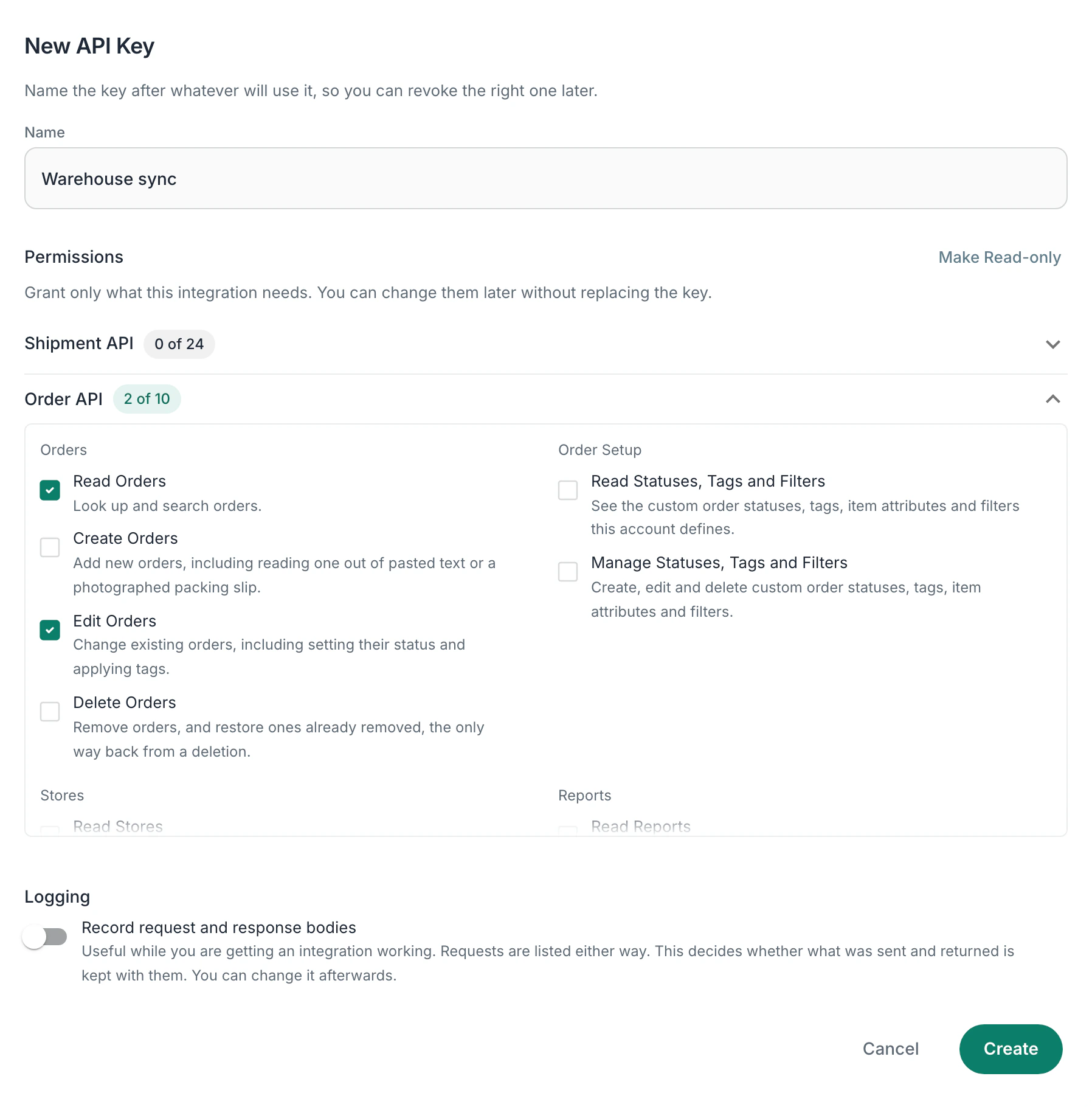
In Postsale, go to Settings > Integrations > API keys. Pick the permissions the key needs, grouped by what they touch: shipments, labels, carriers, pickups, manifests, addresses, shipping rules, documents, orders, stores and reports.
Step 2
Open the API Reference
Hand your new key to the reference and sample requests run against your own account.
Features
What you get with API.
Permissions you choose per key
Grant only what an integration needs. Permissions that spend money, send a courier, disconnect a carrier or delete something permanently are called out where you choose them.
Shipment and Order APIs
Create and rate shipments, buy and void labels, schedule pickups, close out manifests and read or update orders, statuses, tags and stores.
See what each key did
An activity log shows the requests a key made, the outcome and the response it received, so a rejected key is easy to tell apart from a wrong URL.
Rotate, narrow or disable
Edit a key's permissions or switch it off from the same screen. Billing and account-security endpoints are off limits to API keys entirely.
Questions
About API and Postsale.
Which plan includes API access?
API keys are on the Soar plan, which includes unlimited shipments a month.
Where is the API documentation?
The full API reference is published at developer.postsale.com. It covers both the Shipment and Order APIs with endpoint details and example requests, and a key created in Postsale can be handed straight to it so samples run against your own account.
Can I limit what an API key is allowed to do?
Yes. You choose a key's permissions when you create it and can change them afterwards. Permissions are grouped by resource, so a key that only reads shipments can be issued without any ability to buy labels or change orders.
How is this different from webhooks?
Webhooks push data between Postsale and your systems as events happen. The API is for making requests yourself, when your own code decides to. Many integrations use both. For example, a webhook tells your system an order was imported, and your code calls the API to create a shipment for it and buy the label. When that label's tracking changes, another webhook lets you know.
Is there a command-line tool?
Yes. The Postsale CLI puts the same account on the command line, with direct commands, a plain-language mode and explicit gates before anything spends money. It signs in with your Postsale account, and uses an API key for jobs that run without you.
Try Postsale with the API.
Predictable pricing. No per-label software fees.
14-day free trial No card to start Cancel anytime Human support from day one