FedEx: Schedule a Pickup
Schedule & Cancel a FedEx pickup in Postsale
Schedule and manage pickups for your FedEx Ground® and FedEx Express® packages directly in Postsale.
Before We Begin
This article assumes that:
- You have a FedEx account added to Postsale
- You have at least one FedEx Ground® or FedEx Express® package ready to be picked up
Check with the Carrier
Before scheduling a pickup, it’s a good idea to check with the carrier to see if there are any extra fees to do so and to make sure that pickups are available in your area.
Schedule and Cancel FedEx Pickups
To schedule a FedEx pickup:
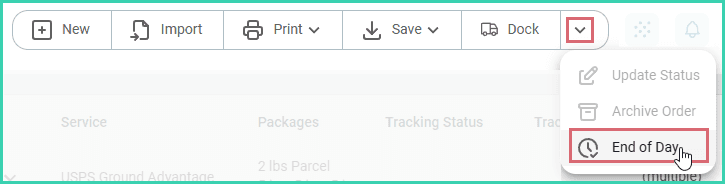
Select End of Day from the Order Actions Menu.
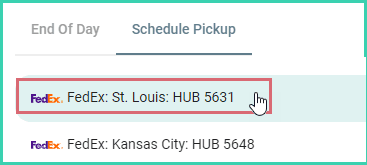
Select the Schedule Pickup tab.

Select the FedEx account.
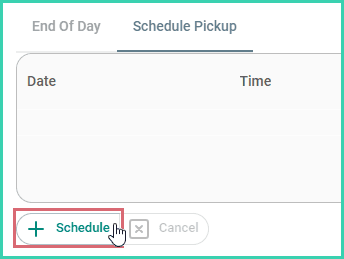
Click the Schedule button.
Verify that the following information is correct. Then, click Next.
a. Pickup Date: Select the date of the pickup.
b. Carrier: Select whether the pickup is for FedEx Ground® or FedEx Express® packages.
c. Type: Specify if the packages are for domestic or international destinations.
d. Ready Time: Select the time your packages will be ready to be picked up.
e. Close Time: Select the latest time that your packages can be picked up.
f. Package Location: Select where your packages will be physically located.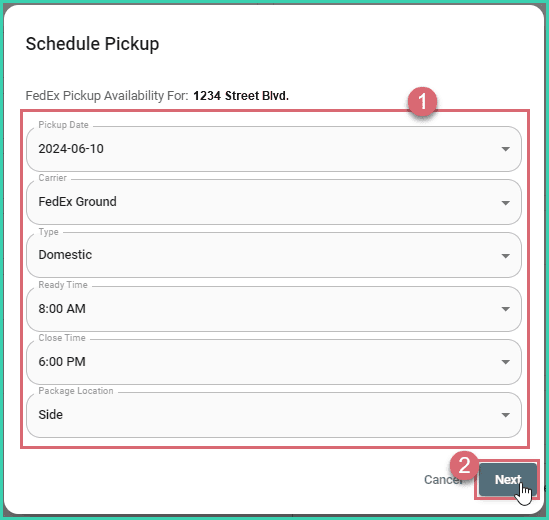
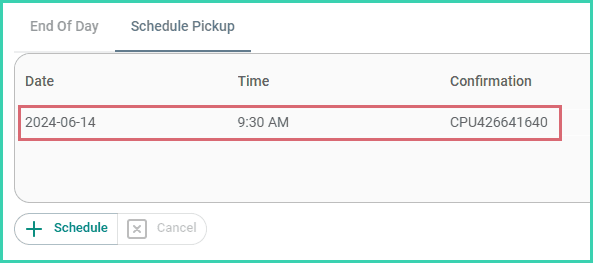
The pickup is scheduled and is displayed in the Pickup section.
Pickups Cannot be Edited
Once a pickup has been scheduled, it cannot be edited or modified. When you need to change a pickup, please cancel the current pickup and create a new one with the correct date and time.
To cancel a pickup:
Select End of Day from the Order Actions Menu.
Select the Schedule Pickup tab.
Select the FedEx account.
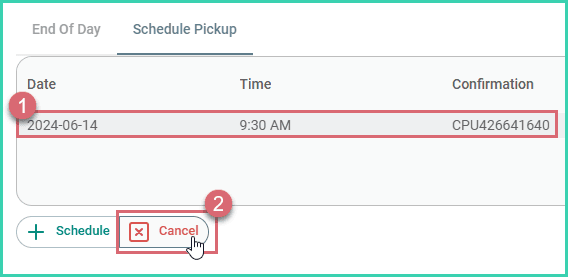
Select the pickup you wish to cancel. Then, click the Cancel button.
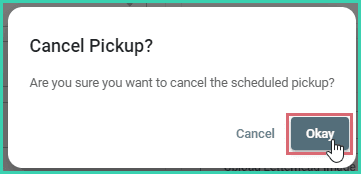
Click Okay to verify that you wish to cancel the selected pickup.
The pickup is canceled and removed from the list of pickups.
On this page