Connect Your Shipping Carriers
Learn how to connect your USPS, UPS, and/or FedEx accounts to Postsale.
This article covers the basic requirements and steps for adding carrier accounts to Postsale, provides a quick overview of the carrier accounts you can add, and includes links to additional help articles and Quick Tip Videos with more specific information on creating new or adding your existing FedEx, UPS, and/or USPS accounts.
Basic Steps to Get Started
Whether you are connecting a USPS, UPS, or FedEx account to Postsale, the first few steps are the same:
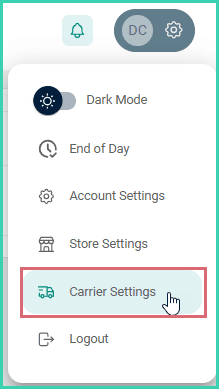
Go to Settings.

Select Carrier Settings.
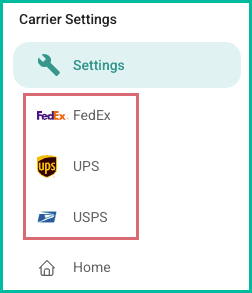
Select the correct carrier in the Carrier Settings section.
Click Add [Carrier Name] Account to launch the setup wizard.

The setup wizard launches and guides you through adding your carrier account to Postsale.
Carrier Specific Information
Select the tab for the carrier you are adding to Postsale. Additional carrier-specific information is provided, including:
- General information about the carrier integration
- Specific requirements for adding the carrier account to Postsale
- Links to detailed help articles and Quick Tip videos related to the carrier
Postsale is a certified FedEx Compatible solution provider. Add your FedEx account to Postsale to:
- Enjoy your negotiated rates across all service levels
- Create domestic and international shipping labels using your FedEx account
- Take advantage of Electronic Trade Documents (ETD) when shipping internationally
- Ship using FedEx Ground Economy (formerly SmartPost)
- Schedule pickups directly from Postsale
- Perform FedEx Ground Close and print an End of Day Manifest
Before You Begin
To connect your FedEx account to Postsale, you will need:
- Your FedEx account number
- The shipping address, email address, and phone number used when you created your FedEx account
- Access to the cell phone or email associated with your FedEx account or a recent invoice in order to verify your FedEx account
Helpful Resources
- Click here for a list of help articles with detailed information on adding your FedEx account, FedEx features, editing your FedEx account details in Postsale, and more.
- You can also watch our Quick Tip Video. It guides you through adding your FedEx account to Postsale.
Connect your UPS account(s) to Postsale to:
- Use your own account rates and negotiated discounts
- Calculate and preview UPS shipping rates
- View estimated transit times
- Print shipping labels for domestic and international UPS services
Before You Begin
To connect your UPS account to Postsale, you will need:
- Your UPS account username or email address
- Your UPS account password
- Your UPS account number
No UPS Account? No Problem.
We have partnered with UPS to offer you the opportunity to sign up for a UPS account with built-in discounts. Once you have created your account, return to Postsale to finalize the setup process with your new UPS account information.
Helpful Resources
- Click here for a list of help articles with detailed information on adding your UPS account, UPS features, editing your UPS account details in Postsale, and more.
- You can also watch our Quick Tip Video. It guides you through adding your UPS account to Postsale.
As an official USPS partner, Postsale lets you directly leverage USPS's domestic and international services. Connect your USPS Business account to:
- Calculate and preview USPS shipping rates
- Receive discounted USPS postage rates
- Take advantage of your existing NSA (Negotiated Service Agreement) rates
- Automatically apply cubic pricing when it is identified as the cheapest rate
- Ship Hazardous Materials (HAZMAT)
- Print SCAN forms
- Schedule USPS pickups
- Manage your postage account directly with the USPS
Before You Begin
In order to connect your USPS account to Postsale, you will need:
- A postage account with the USPS
- Your USPS account username and password
Helpful Resources
- Click here for a list of help articles with detailed information on adding your USPS account, USPS features, how to edit your USPS account details in Postsale, and more.
- You can also watch our Quick Tip Video. It guides you through adding your USPS account to Postsale.
On this page
Related