FedEx: Home Delivery Premium®
Specify when your shipment arrives with FedEx Home Delivery® Premium
Use FedEx Home Delivery® Premium to customize when your residential shipment will be delivered to your customer. Postsale allows you to use:
- FedEx Date Certain Home Delivery®: Get delivery on the date you choose.
- FedEx Evening Home Delivery®: Get delivery between 5 p.m. and 8 p.m.
- FedEx Appointment Home Delivery®: Get delivery on a specific date, during your chosen 2-hour window.
Before We Begin
This article assumes that:
- You have a FedEx account added to Postsale
- You have at least one order ready to be shipped
Add Home Delivery Premium®
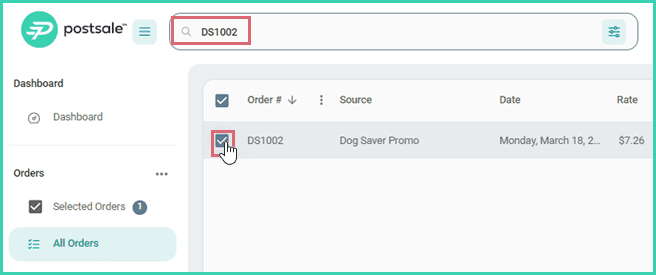
Search for and select the order in the Orders Grid.
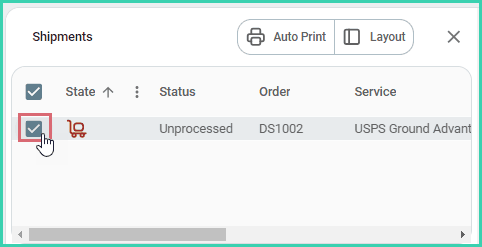
Verify that the shipment is selected in the Dock.
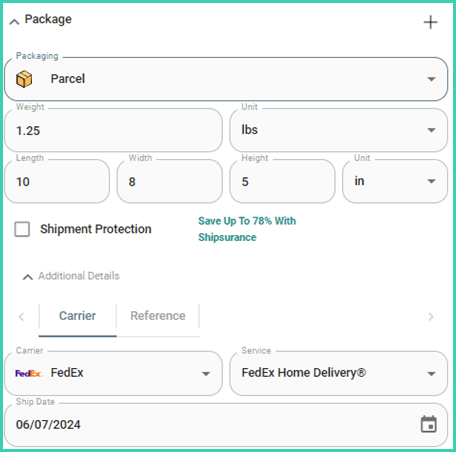
Configure the shipment details for FedEx Home Delivery**®**.
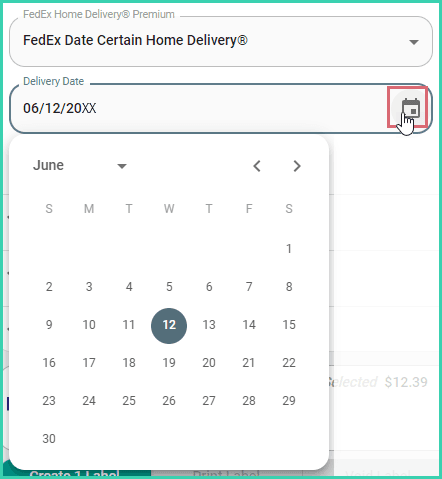
Expand the FedEx section of the Dock. Then, select the correct option from the FedEx Home Delivery® Premium drop-down menu.
a. FedEx Date Certain Home Delivery®: Be sure to select the date you wish for the package to be delivered on from the Delivery Date field.
b. FedEx Evening Home Delivery®: The package will be delivered between 5 p.m. and 8 p.m.
c. FedEx Appointment Home Delivery®: FedEx will contact the recipient by phone in advance to schedule the delivery. Be sure that a valid phone number has been included in the Ship To address of the shipment. This is the phone number that will be used by FedEx to contact the recipient.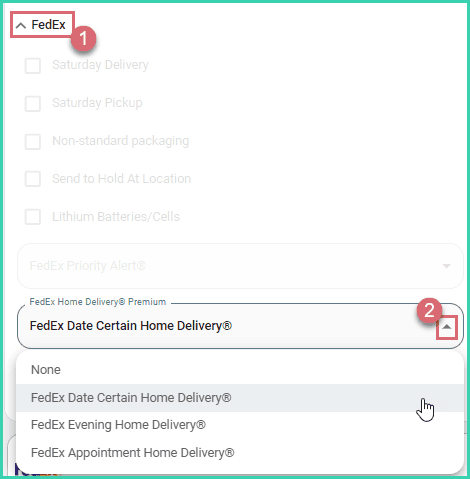
Ensure that all other shipment details are correct. Then, create the label.

Good to Know
- FedEx Home Delivery Premium® can only be used for packages being shipped to residential addresses using FedEx Home Delivery®.
- When the Ship To address is identified by FedEx to be a commercial address, an error will occur and the label will not be created. In this event, you may wish to check with your customer to ensure the Ship To address is correct and is a residential address.
On this page
Related