FedEx: Priority Alert®
Add FedEx Priority Alert® or Priority Alert Plus® to your shipments
Postsale gives you the ability to add FedEx Priority Alert® to your high-value, time-critical, or temperature-sensitive shipments. With FedEx Priority Alert, FedEx assigns your account to a global service analyst who provides around-the-clock support, advanced shipment monitoring, personalized notification in the event of a delay, and customized package recovery.
Before We Begin
FedEx Priority Alert®
FedEx Priority Alert® is a contracted service. Please reach out to your FedEx account executive to learn more about the service and to discuss whether it is a good fit for your business needs.
This article assumes that:
- You have a FedEx account added to Postsale
- You have at least one order ready to be shipped
Add FedEx Priority Alert®
To add FedEx Priority Alert® or Priority Alert Plus® to your shipments:
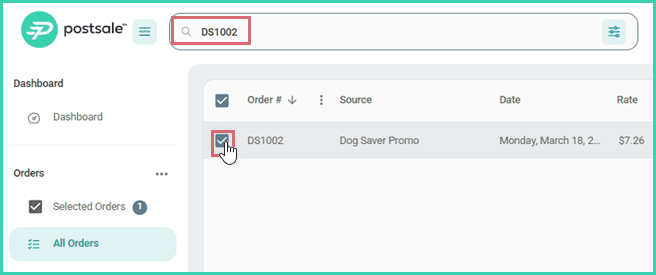
Search for and select the order in the Orders Grid.
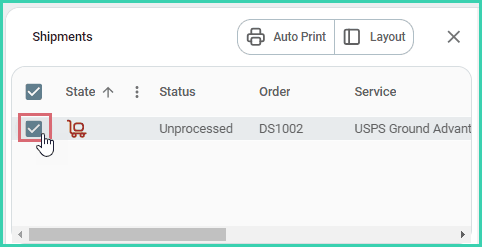
Verify that the shipment is selected in the Dock.
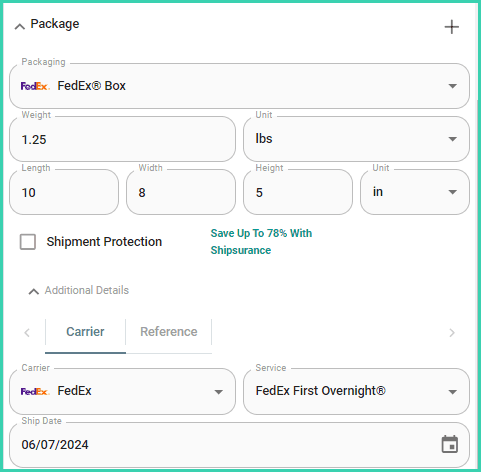
Configure your FedEx shipment.
FedEx Priority Alert® and Priority Alert Plus® can only be used when shipping with the following services:
- FedEx First Overnight®
- FedEx Priority Overnight®
- FedEx First Overnight® Freight
- FedEx 1Day® Freight
- FedEx International First®
- FedEx International Priority®
- FedEx International Priority® Freight
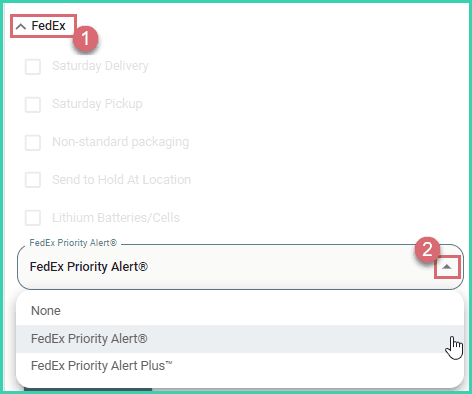
Expand the FedEx section in the Dock. Then, select FedEx Priority Alert® or Priority Alert Plus® from the FedEx Priority Alert® drop-down menu.
Verify that all other shipment details are correct. Then, create the label.

On this page
Related