Address Suggestions & Validation Settings
Ensure your addresses are correct with address suggestions | Residential & Commercial addresses | Unverified addresses
Dealing with a delayed or lost shipment due to an invalid Ship To address costs you time, money, and your customers' trust. Invalid addresses may also incorrectly cause upcharges when the address is incorrectly identified as residential vs. commercial. Fortunately, Postsale offers address suggestions to help ensure the addresses associated with your shipments are correct.
Address suggestions can be viewed and applied to an address just about anywhere an address is entered in Postsale. For example:
- Ship To addresses
- Ship From/Origin addresses
Let's explore how to view and apply address suggestions and how Postsale can help you correctly identify Ship To addresses as commercial or residential.
View & Apply Address Suggestions
Residential vs. Commercial Addresses
Use an Unverified Address with USPS
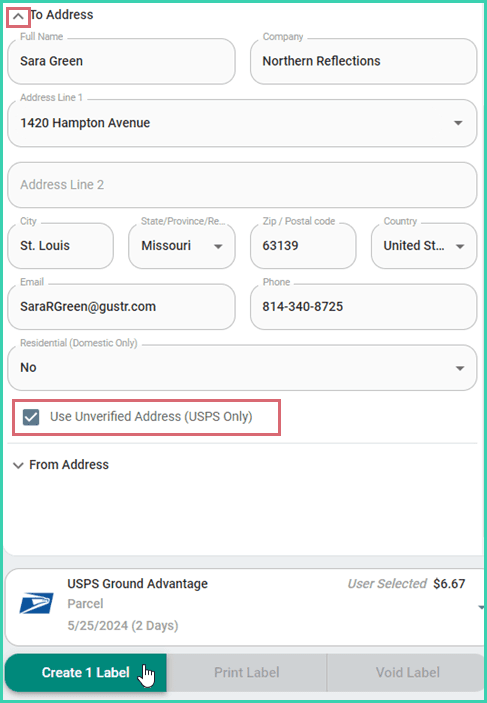
In some instances, USPS may return an error that the shipping label cannot be created because the Ship To address could not be validated. Postsale offers a workaround so you can create the label when this occurs.
Check with your Customer
Before using the Use Unverified Address option described below, we suggest that you reach out to your customer to verify that the Ship To address is correct and to double-check that the address is entered into Postsale correctly. This will help avoid the cost of shipping an undeliverable package.
If you encounter this issue and are sure that the Ship To address in Postsale is correct:
Select the shipment in the Dock.
Expand the To Address section.
Check the Use Unverified Address (USPS Only) checkbox.
Create the label.
On this page
Related